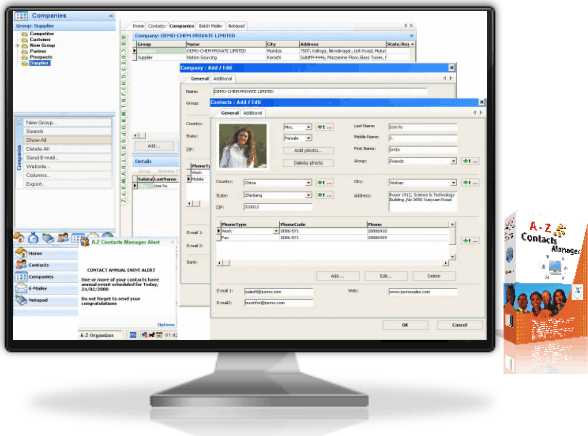
Family, Friends, Clients, Customers, Partners, Mailing List, Address Labels, Notes, Reminders - the easy way to manage them all!
Customizable contact data entries by categories for easy search and management.
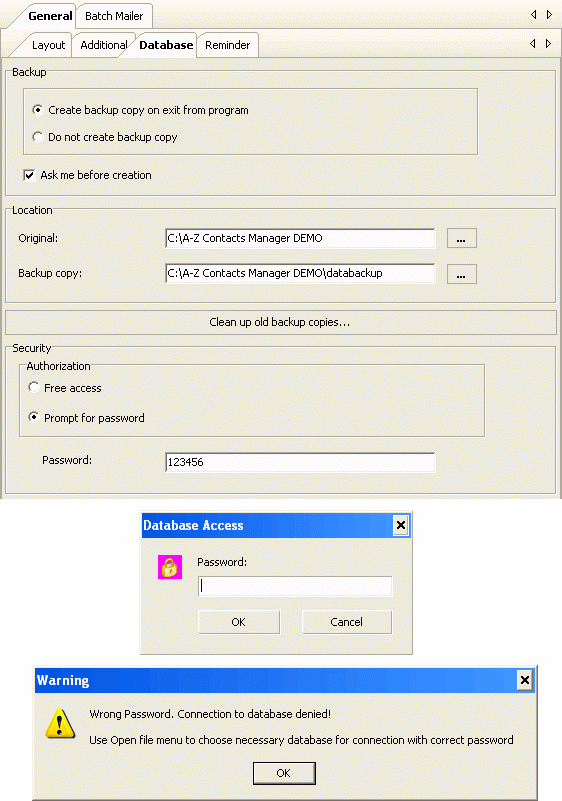
Database password security option to protect your information from instrusion, curious eyes and unwanted guests. With security options set on, only you can have access to information in your database.
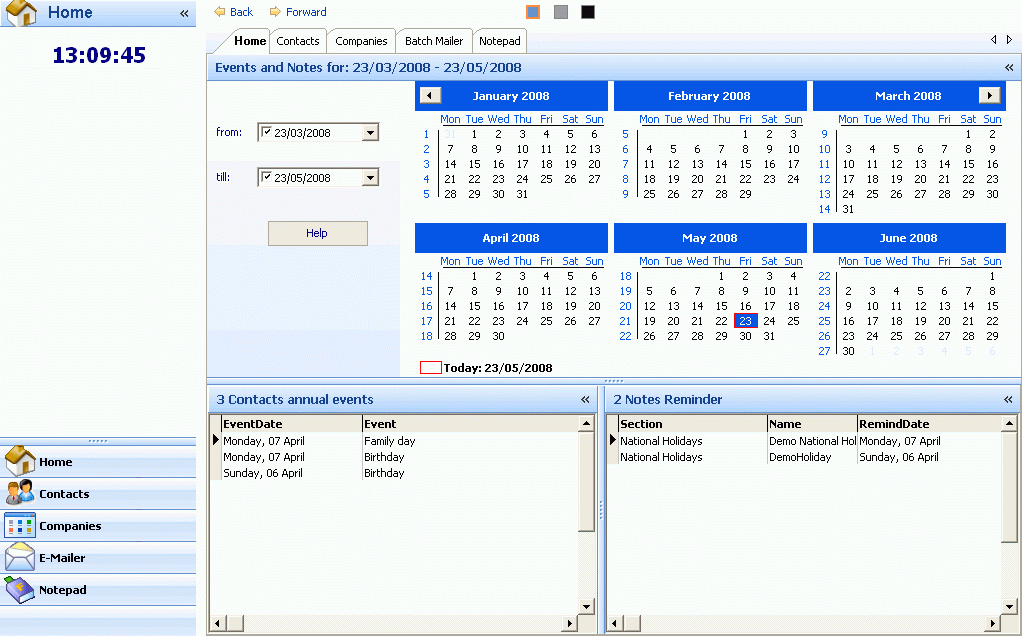
Sound and pop-up reminders to remind you about your contacts' important dates (birthdays, anniversaries, family day etc) you have earlier saved in the database, but might have forgotten about.
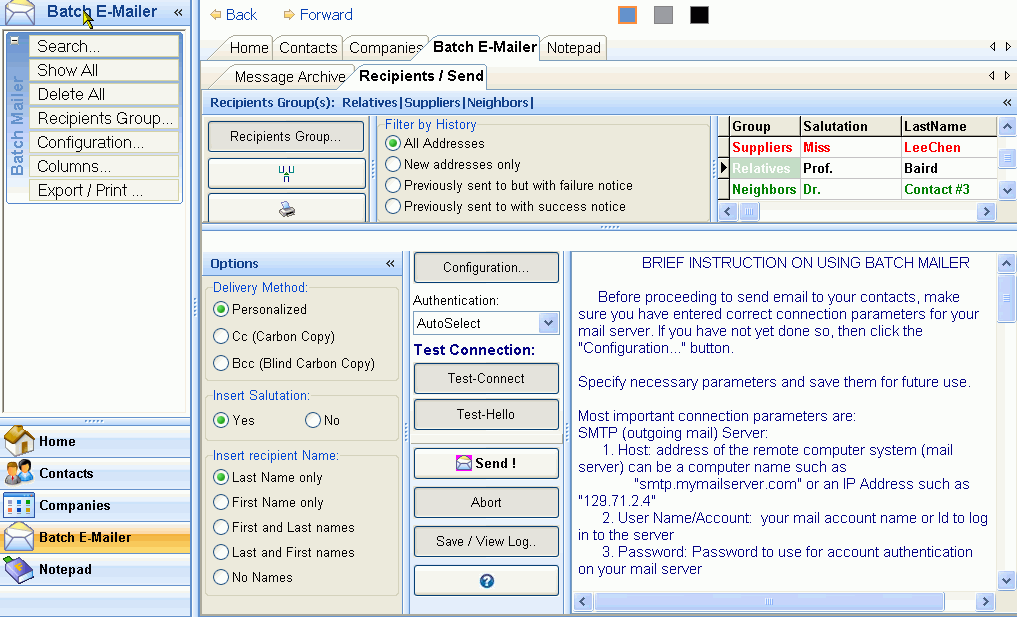
Built-in bulk e-mailer you can use to send a single message attachment to all or selected group(s) among your contacts with ONE click of the button.
Contacts Mailing Address Label Generator directly from your contacts' database - a handy extra that can cost additional money if purchased separately.
Promotional Offer
For only:
$69.99
Computer Programs for managing your contacts database. All you need to know!
The best contact management program for small and home business: contact list, contact categories, mailing list, return address labels, notes, auto-reminder
ShortDescription
A-Z Contacts Manager is a very powerful program you can use to manage your
contacts database: personal or business contacts, clients, customers, suppliers, competitors, debtors, friends, relatives, hobbies, notes and many more.
A-Z Contacts Manager comes with events reminder to mark many events dates you wanted to be
automatically reminded about, e-mail marketing tool to send bulk, yet personalized e-mail messages with file attachments to all or selected groups of your
contacts, birthday organizer and many other advanced functions and features
A-Z Contacts Manager is also equipped with advanced data import utility you can use to
import contacts data from Microsoft Outlook Address Book, Microsoft Outlook Express Address Book, Windows Address Book (WAB), and from many database
and spreadsheet programs including Microsoft Excel, Access, Open Office tables, CSV files etc. so you do not need to repeat the tedious
job of manually filling contact info into the database from scratch. Data import from external sources had never been so easy!
A-Z Contacts Manager comes with advanced mail merging facilities and
label designer to ease your task of creating mailing address labels, postal envelopes, badges with layouts for Avery and ISO paper
formats. Data is automatically used from your database - on the fly.
And with the multi-user version of A-Z Contacts Manager (A-Z Contacts Manager NT), many
users can share/use a common database via the local network - ideal solution for small and medium businesses.
KeyFeatures
Easy Contact/Company data management
Cross-Link several Contacts to one company in the database
Get organized. For easy recognition and data search, create unlimited categories, groups and lookup fields to store contact information.
Personal Contacts
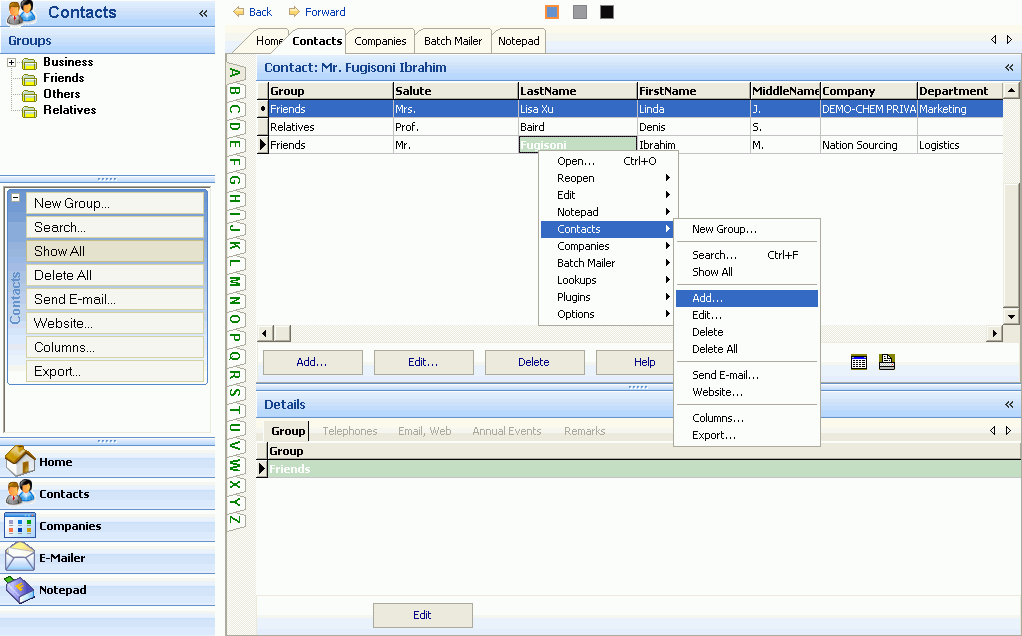
For personal contacts you can create unlimited number of category groups (family, school mates, friends, relatives etc.) for your contacts data entries in the [Contacts Section]
Typical personal contact data entry may include, but not limited to: names, birthdays and anniversaries, occupation, job description, location, telephones, emails etc.
Business Contacts
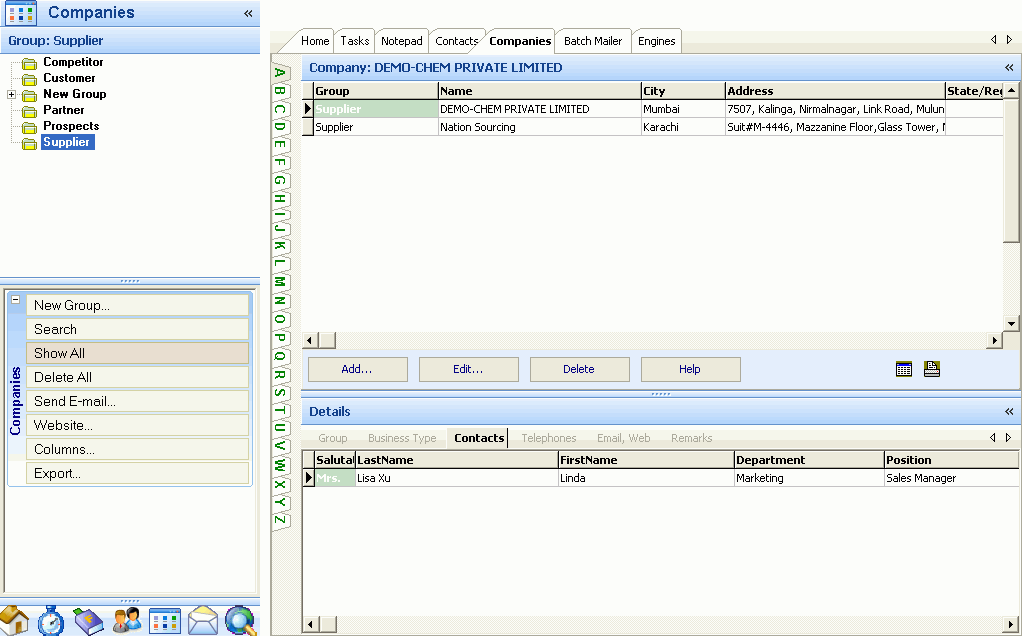
If your contacts are business entities then, in a separate section [Companies], you can also categorize them into groups (suppliers, competitors, partners,
clients, officials, creditors, debtors, key accounts, prestigious accounts, prospects etc). Full information may include, but not limited to: name,
location, region, telephones, emails, area of business, activities, banker, decision
makers, rating in the market, source of information (leads) etc.
If required, you can automatically link (affiliate) your business contacts to companies in the
database, so you can know at a glance which contacts work in what company, set reminder for
important dates and events such as company anniversary.
Import Contact data from External Sources
Data import facility
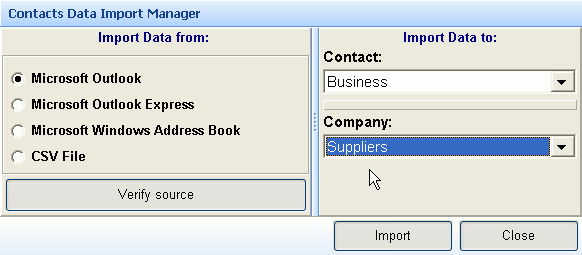
A-Z Contacts Manager is equipped with advanced data import utility that supports direct import of contacts data from Microsoft Outlook Address Book, Microsoft
Outlook Express Address Book, Windows Address Book (WAB), and also from any database and spreadsheet program including Microsoft Excel, Access, Open Office
tables.
If you have your contacts data stored somewhere else, you do not need to repeat the tedious job of manually filling contact info into the A-Z Contacts Manager's database from scratch.
With only a click of the button, you can now import your business/personal contacts info into A-Z Contacts Manager's database from external sources. Full contacts data - name, telephones, fax, emails, website, city, state, country, company name, department, job title and even birthday for each of your contacts - will be copied from external sources and imported into the database.
Less typing - Less errors
Miscellaneous information organizer
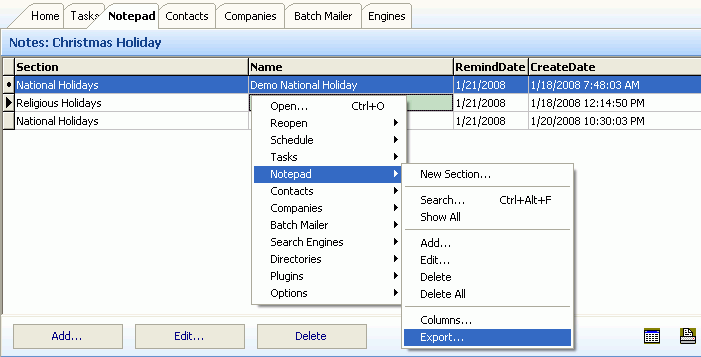
Notes organizer
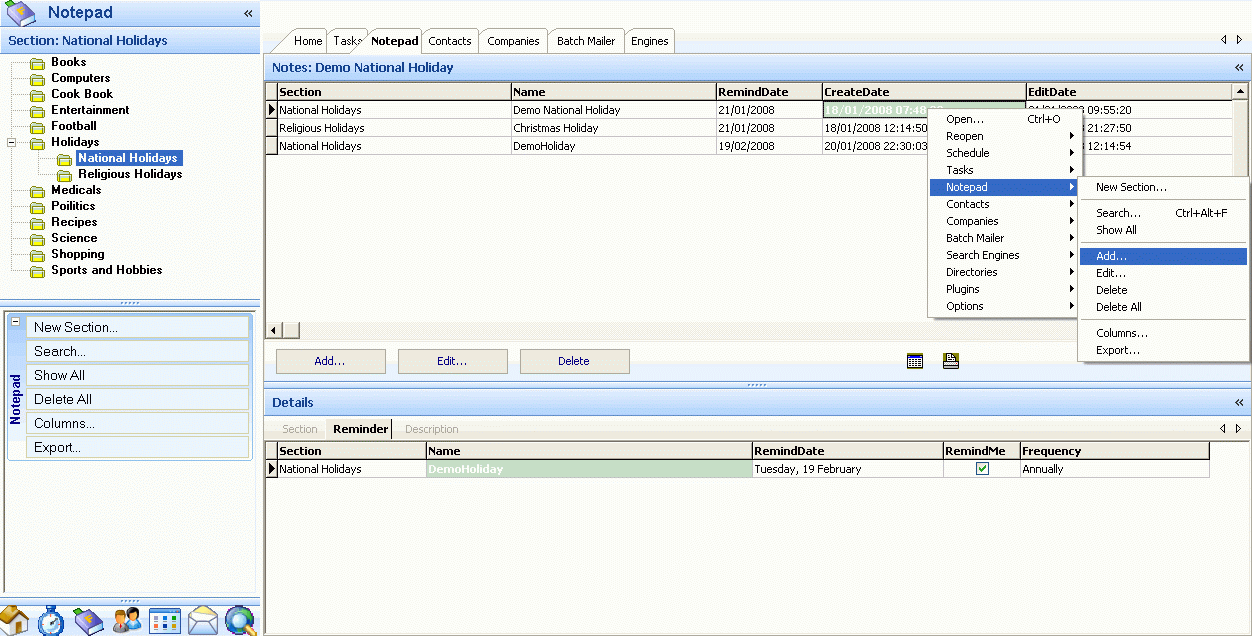
A-Z Contacts Manager comes with rich text format Notepad that helps you keep miscellaneous information tidy and separate in easy-to-manage folders.
For information that does not fall under key sections such as [Contacts] or [Companies].
You can create unlimited category folders and store information such as your hobbies, sports, holidays, leisure, shopping, recipes, to-do-list,
important tasks, books and their authors, films, software licenses, political events etc.
No sticky notes or lost information
Reminder for important events and dates
Use A-Z Contacts Manager calendar to quicky select your important tasks, birthdays and/or anniversary for the day
A-Z Contacts Manager's Audio and pop-up alert system keeps in memory important events and dates and will remind you early enough to take necessary action: be it your contact birthdays, family day, national or religious holidays, company anniversaries, high-priority tasks, important notes, etc. Nothing is forgotten, nothing is missed.
Advanced bulk E-mailer
Contacts Manager with Mailing list compiler and Newsletter
Another key feature of A-Z Contacts Manager is advanced built-in bulk e-mailer you can use to
send personalized message with attachment to tens/thousands or selected group(s) among your contacts with only one click of the
button, saving you time and communication expenses - economical way to Advertise, reach clients or friends fast. Sales and/or marketing
campaigns, price updates to your business contacts, new year or birthday greetings with cards to friends and relatives are good examples
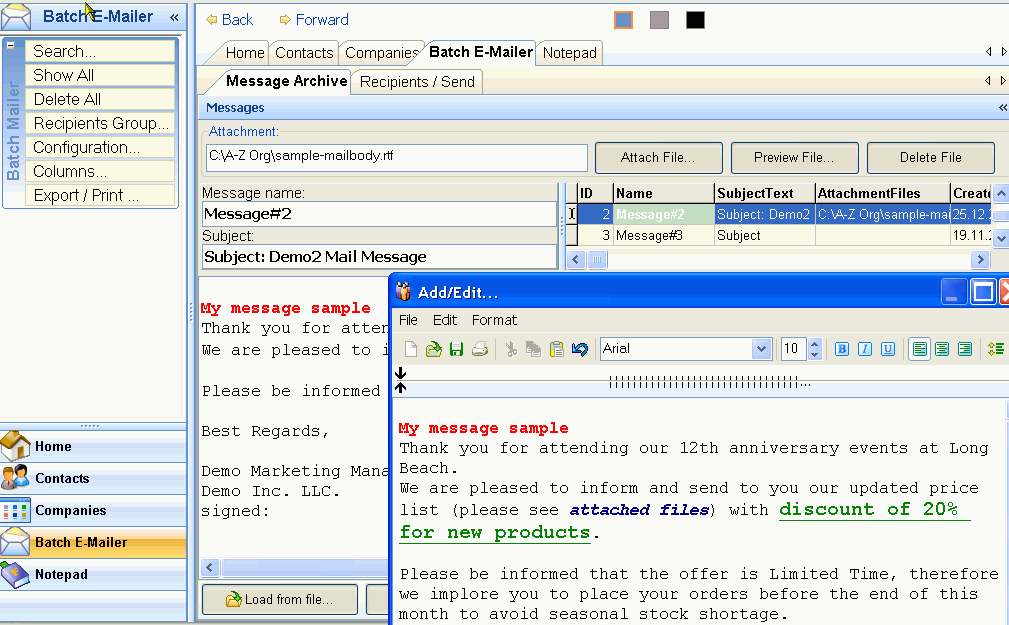
Compile email messages once, save them in the message archive and use them as many times as possible in future, saving you the headache of repeating the
job. A-Z Contacts Manager stores all your e-mail messages, file attachments as correspondence
in the database for future use and references
By default, each e-mail message is personalized, automatically stamped and sent with greeting, salutation,
first and last names of the recipient, date and time, therefore can never be rejected as spam by your mail server, nor can you ever be
accused of sending spam
For your email marketing campaign or personal purposes, you can send bulk emails as simple text,
html, rich text with all common attachments including, but not limited to : html, word, excel, image files, video files etc.
With mail receipt confirmation option set on, you will be able to receive and monitor feedback from recipients of your emails, so you are certain you have
not labored in vain.
Flexible report templates
Contact data export to Word, Excel, Plain Text, Rich Text, HTML, Comma-separated Text, Tab-separated Text, Data Interchange, SYLK
A-Z Contacts Manager enables you to export records from your database directly to your office programs for further manipulation or save the records into files of various formats such as: Word, Excel, Plain Text, Rich Text, HTML, Comma-separated Text, Tab-separated Text, Data Interchange Format, SYLK Format.
Multi-level data search facility
Contact database search program with advanced data retrieval
Searching the database for information had never been so easy!
A-Z Contacts Manager comes with simple, yet extremely powerful data search and retrieval tools inluding, but not limited to:
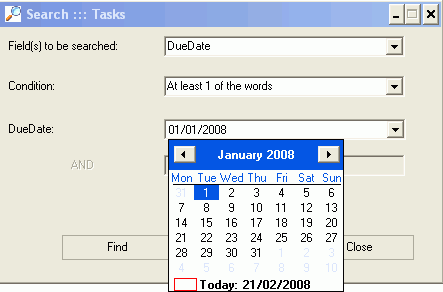
All possible combinations of search criteria : equal to, greater than, less than, between etc.
Full or part word search
Date-time fields search with your system date picker
Database protection and backup
Database security
To protect your privacy, guard against system failures, your personal/business contacts info are kept safely in password-protected
database with back-up, defragmentation and repair facilities. Thus,
A-Z Contacts Manager enables you to protect your database with password in order to ensure
your privacy from intrusion, keep abbey curious eyes and unwanted guests. Nobody else, apart from you, can have access to information stored in
your database
Database Backup function guards against information loss and file corruption. If anything goes wrong with your original database,
you can always restore your data by using a back-up copy. Use this feature each time you exit the program
A-Z Contacts Manager also comes with database repair and clean-up functions to auto-correct
database errors (if any), regularly defrag, fine-tune and keep your database performance in top gear
20 + 1 reasons to useA-Z Contacts Manager
Easier and faster than scraps of paper or Excel or Word.
Keep information in secure, password-protected database.
Work off-line. No Internet connection required. No monthly fees.
Import contacts info directly from your email programs, spreadsheets etc. Save time
and nerves.
Manage contact and miscellaneous information more effectively by groups,
categories, with auto reminder for important dates, anniversaries etc.
No special knowledge or expertise is required. No additional drivers or third-party
application to install. Everything has been simplified for the average user.
Can be used by individuals, small and medium businesses to manage personal or business
contact information.
Use for any number of users, from 1 to 1000, with only one database to share
among them all.
If required, attach (affiliate) contacts to company automatically from drop-and-select list of
companies.
Use to conduct spam-free personalized e-mail marketing at no additional cost.
Store e-mail messages in archive and use them as often as possible.
Automatically configure outgoing mail server parameters.
Automatically test your mail server for readiness.
Export data from your database to other office programs - Word, Excel, Html, Text,
WordPad etc. OR
Directly use data to design labels (including mailing address stickers,
envelopes, badges) for printing.
Customizable options to march your individual preferences.
Experiment with different table colors and sizes, handle inevitable contact
information changes without stress.
Inexpensive. 4 in 1 software being offered for the price of one.
Ready-to-use solutions with detailed help documentation.
Free technical support ensures you always have the latest version of the
application running on your PC.
Flexible licensing - Purchase 1 license and use it for many computers. You can install the software on as many computers
as you want, transferring your license to them unlimited number of
times.
There are no limitations in relation to number of times you can run purchased programs.
You buy it - it is yours forever.
Version History/Change Log/
Version
Release Date
Updates Log
v3.1.9.18
Nov, 2017
Contacts Category Manager improved for multi-selection
More tweaks for Windows 10
v3.1.7.12
Apr, 2016
Some bugs in address labeling module fixed
Mail Manager memomory leakage problem fixed
Some tweaks for Windows 10
v3.1.1.97
January, 2015
Application Initialization routine further optimized to reduce load time
Contacts birthday auto-reminder with calendar added to program start/home page
Database clean-up and auto-repair mechanism further enhanced
Some additional tweaks
v3.1.1.89
November, 2014
Major updates.
Contacts Mailing Address labels can now be saved as images and also exported as pdf file
Database auto repair and defrag utility added
Some tweaks and optimizations
v3.1.1.83
August, 2013
Minor updates. Label designer linker optimized for latest Windows versions
v3.1.1.75
April, 2013
Additional fonts for label designer added to the existing collection
Major updates. Multi-search functions added. Loading splash screen. Some tweaks and optimizations
v3.1.1.44
May, 2011
Minor errors in data export sql statements corrected
v3.1.1.41
March, 2011
Major updates.
Added customizable report templates for Data export as tables to popular office programs
Data export as full report to rft and htm files
Some minor optimizations to search mechanism.
v3.1.1.39
January, 2011
Audio and pop-up alert errors fixed for Windows Vista
Defrag and indexing functions added
Some minor optimization
v3.1.1.37
October, 2010
EU (12hr, AM/PM, dd.mm.yyyy) date-time format capability added.
From the options and settings page (scheduler), user may switch between US and EU formats.
Some minor optimization
v3.1.1.33
July, 2010
Bulk emailer can now be used for both business and personal purposes
Added Contact annual events and birthday organizer
Annual events automatic selector with electronic greeting cards sender via bulk emailer
v3.1.1.29
April, 2010
Major updates.
Added Contacts data import utility for spreadsheets, Excel, Access, Open Office etc
Added Contacts data import utility for popular database programs
Data Import manager bugs fixed
v3.1.1.27
April, 2010
Major updates.
Contacts data import utility from major email programs' address books
Program load time optimized
Batch E-mailer mailing list re-cloning function added
v3.1.1.21
January, 2010
Multi-factored database security model added for Multi-user version
Help files and documentation updated to reflect most current changes
v3.1.1.19
December, 2009
Major updates.
Batch E-Mail section splitted into two sub-sections: Message Archive and Recipients/Send
Number of file attachments increased from 1 to Unlimited for Multi-User version.
For Single-user version the maximum attachments remains unchanged, i.e. 1.
Login type AutoDetect method added to Batch E-Mailer mail server connection options
Receipt Confirmation option added to Batch E-mailer Configuration
Test-Connect (ping) and Test-Hello (handshake) options added to connection methods
v3.1.1.9
December, 2009
Major updates.
Batch E-Mail section splitted into two sub-sections: Message Archive and Recipients/Send
Number of file attachments increased from 1 to Unlimited for Multi-User version.
For Single-user version the maximum attachments remains unchanged, i.e. 1.
Login type AutoDetect method added to Batch E-Mailer mail server connection options
Receipt Confirmation option added to Batch E-mailer Configuration
Test-Connect (ping) and Test-Hello (handshake) options added to connection methods
v3.1.1.6
September, 2009
Major updates.
New functions added to Batch Mailer
Mailer can now send personalized emails to recipients, automatically inserting greetings, salutation, first and last names
into the message body
Batch Mailer can now send copies of one single email message to recipients as Carbon Copy or Blind Carbon Copy
Mail account configuration parameters are now automatically extracted from default mail account on user system and used to configure Batch Mailer
Emails can now be sent as Plain Text or Html
v2.1.0.17
August, 2009
Major updates.
Location (country, state, city) lookup tables are now cross-linked to ease selection
Some serious bugs in the contacts data entry form fixed. This section used to freeze due to error in the cross-links between the master contacts
table and corresponding lookup tables.
Database re-structured, synchronized and optimized in preparation for multi-user version to be released in the nearest future.
Mail account configuration parameters are now automatically extracted from default mail account on user system and used to configure Batch Mailer
Minor tweaks and optimizations.
v2.1.0.17
System date-time calendar bugs fixed
Information search and retrieval mechanism improved
Sections group panel information display bugs fixed
Minor tweaks and optimizations
v2.1.0.13
Analog clock added to program main page in addition to digital version. Users now have options to switch between
Program free updates(for registered users only) now fully automated with dialog options
Minor tweaks and optimizations
v2.0.0.11
Fixed hang-up bugs experienced by Windows Vista users during record entries manipulation
Added database scanning, repair and clean-up functions to correct possible errors and flush out orphaned records from the database
Minor tweaks and optimizations
v2.0.0.9
Added Last month and next month automatic tasks selection
Fixed system local date-time format auto-detection bugs
Alarm clock Dll bug fixed
v2.0.0.4
Fixed bug with screen resolution compatibility
Minor tweaks and optimizations
v1.0.0.5
Updated Windows Vista detection routines
Added additional error checking routines
Fixed bug in database backup folder detection
v1.0.0.2
Simple Batch Mailer added for sending bulk email to contacts in the database
Notes reminder pop-up alert with audio added
Major tweaks and optimizations
v1.0.0.1
November 03, 2007
A-Z Contacts Manager First released
Desktop/Laptop version of A-Z Contacts Manager is suitable for personal, home, small and
medium business. Before you decide on purchasing the software, however, we strongly recommend that you download the free trial version to be certain
it meets your needs and expectations. A-Z Contacts Manager has been Designed for Microsoft Windows® Operating System. To start your free
trial, click the Download Now! button below.
6,78 mb
SystemRequirements
Minimum System Requirements
Intel Pentium 166 MHz or higher
All versions of Microsoft Windows, including 98, 2000, XP, Vista, Windows7 (32 or 64 bit)
128 Mb RAM
10 MB free hard disk space
SVGA or higher resolution monitor
Recommended screen resolution: 1024 x 768, Color depth: 256 colors
Mouse or other pointing device
InstallationInstructions
The downloded package comes with program Installation wizard.
that makes the process smooth and easy. By default A-Z Contacts Manager will be installed in your computer default programs folder,
which is normally C:\Program Files\ The installer will automatically create the necessary folder for A-Z Contacts Manager
under default directory. Of course, before or during installation, you will be prompted to confirm installation into the default or choose any
other directory on your computer. For example, C:\My Programs. Browse to choose the necessary folder if you do not want to install A-Z
Contacts Manager under default directory.
Using your file manager, open the folder where you have downloaded the installation file.
If the file is a zip package, uncompress it to a temporary folder and launch the setup file
If the file is a setup executable, launch the installation file (click on the setup.exe icon)
Follow the installation instructions. The installation wizard will guide you through the installation process.
In many cases, rebooting after installation is not necessary. However, the installer may update some Windows system components, which will require you to reboot at the
end of the installation. In addition, if you are installing on Windows 95/98 or Windows Me, you may wish to reboot to have your PATH
environment updated. All files replaced during installation are copied and saved into backup folder on your computer.
Notes
If the downloaded installation file is corrupted you should delete it from your hard drive and try to download it again. If you are still not able to install
downloaded product please contact us and will assist as soon as possible.
How toUninstall
During installation, many files are transfered to your computer and certain records in your system registry are updated.
De-installtion is the reverse process of installation. It entails removing the files and records affected during installation, updating the registry to
previous state before installation. When un-installing, the Installation Wizard will automatically handle all necessary processes.
Therefore, to un-unstall DO NOT JUST DELETE THE PROGRAM FILE(S)THE WAY YOU WOULD A NORMAL FILE.
To uninstall A-Z Contacts Manager from your computer, use one of the following methods:
MethodI
From Windows desktop, choose Start/Settings/Control Panel
Double-click on the Add/Remove/Uninstall Programs icon. A new dialog box opens showing a list of all
installed applications.
Select A-Z Contacts Manager from the list
Double-click the Add/Remove Programs icon
Follow the instructions.
MethodII
Open the folder where A-Z Contacts Manager was installed. If you have installed A-Z
Contacts Manager in programs default directory, then it should be located
in C:\Program Files\A-Z Contacts Manager
Double click the uninstall.exe (unwise.exe) icon
Follow the instructions
Again, DO NOT JUST DELETE THE PROGRAM FILE(S) THE WAY YOU WOULD A NORMAL FILE. Use the uninstallation wizard as described above.
Purchasing A-Z Contacts Manager is as simple as A-B-C. Because your online shopping
security and comfort is most vital to us, we have hand-picked and partnered with FastSpring, a reputable e-commerce services
company that specializes in Secure Order Processing, in whom we have absolute confidence.
OnlineOrder
When you click the Buy Now button, you will be taken to our Secure Payment Gateway to finalize your order.
FastSpring will handle all the billing and payment processing.
Important
Our Online ordering process is 100% secure and safe. All data exchange during payment
process goes through Secure Socket Layer(SSL) encryption. Secure Socket Layer (SSL) encryption is used for every transaction in order to ensure
that your online order and payment information is secure.
Software License activation/Registration takes less than 5 minutes after
payment. A license key lasts indefinitely.
You can pay with Major Credit cards: Visa, MasterCard, American Express, JCB, Discover, Eurocard, Diner's Club. Debit cards: Maestro/Solo (UK), Online wire
transfers, Giropay (Germany), iDEAL (Netherlands), IPS (China), Wire (bank)transfers, PayPal, WebMoney, Checks, Money orders, Cash, Purchase orders, Direct debit,
Invoice
Phone, Fax, Postal or EmailOrder
Once again, we would like to re-assure you that the online ordering process is 100% secure. Orders
placed online are processed more quickly than those submitted by fax or email. However, if you encounter any problem ordering online or you
simply prefer to place your order by fax, e-mail, or phone, please use the information below.
Exact name of the software (A-Z Contacts Manager by Josytal) and, if known, the product ID
The quantity you wish to order
The name the person the product license will be issued to
Your billing address and your delivery address
Your phone number
Your fax number, if available
The e-mail address to which the order confirmation and invoice should be sent, and your e-mail delivery address, if different
Your selected payment option and currency
Get ready all the required information and contact our payment processor:FastSpring Corporate Headquarters
11 W. Victoria Street
Suite 207A
Santa Barbara, CA 93101, US.
tel.: 1-877-327-8914 toll-free US and Canada
tel.: 1-805-409-9008 worldwide
email: info@fastspring.com
If you encounter problems during the ordering/payment process, please contact our payment processor:
FastSpring
Corporate Headquarters
(USA)
European Office
Asian Office
11 W. Victoria Street
Suite 207A
Santa Barbara, CA 93101, US.
tel.: 1-877-327-8914 toll-free US and Canada
tel.: 1-805-409-9008 worldwide
The Meridian 4 Copthall House,
Station Square
Coventry, West Midlands CV1 2FL
England.
207-209, Winland International Finance Center
No.7, Financial Street
Xicheng District, Beijing 100140
China.
email: info@fastspring.com;
info@saasy.com
You can also contact us directly for both technical
support and payment problems
For enquiries relating to software purchase and/or
technical
assistance:
support[at]josytal.com
For enquiries relating to website promotion services
payment and/or
technical assistance:
All quoted prices are gross and final, including all taxes. With us you DO NOT need to pay for software license back-up services, Registration Protection Service, Backup CD, Extended Download, license look-up service, license retrieval
nor any of those rip-offs. No hidden costs, no handling charges, no extra additions mid-way or at checkout. We strictly adhere to what-you-see-is-what-you-pay
policy
On the order processing form, you may select and display currencies in your country's local equivalent and/or select your local language. But
do not confuse billing currencies with display currencies. In order to avoid currency conversion charges(commissions, fees), it is recommended
that you select the billing currency that matches your Credit Card or other payment facility
Our payment processors operate worldwide and will handle VAT matters for corporate clients
A-Z Contacts Manager is offered as digital downloadable product with Activation key. You will be able to download and use the product immediately after
purchase. As additional option, you can also order for the CD (CD-Rom) version of the product to be shipped to your address
We frequently run promotions and occasionally offer discounts on purchases. If you are interested in receiving
promotional offers and/or discounts on your purchases, then we recommend you subscribe to our mailing list. Once there are discount offers, you will
be among the first to know about them
If you feel using desktop/laptop/off-line software to manage your contacts is no longer efficient, then we have a solution
for you. The web-based (online) version of Contact Manager may be exactly what you need. You can use the software Hosted on our server or Install it
on your server.
Contact ManagerWeb-based (online) version
Web-based/online software works on any platform with a web browser and internet connection. Mac, Windows, Linux are all supported.
You do not have to install any CDs, download any software, or worry about upgrades.
You no longer need to worry about hardware, networking or maintaining physical systems.
Accessibility from Desktop, Laptop or SmartPhone from anywhere, anytime
All your data is centralized and accessible over the web from any computer at any time.
You can work from home, work, or on the road.
When you use web-based software your office is everywhere :
At work, at home, a hotel, at a client's office, even on your mobile phone. Your data is accessible anywhere with internet access.
No data duplication/copying on several computers for differrent users.
Just create an account for each user or give them single password/login to access a single account vis the web
You can collect Contacts(visitors) Data and have them posted straight into your database from your Website (via web forms). Less typeing - less erros
Your data can be automatically backed up daily, using Cron Jobs
Software products can be updated automatically via our server without you even noticing it.
You do not need to buy expensive hardware to use A-Z Contacts Manager. A-Z Contacts Manager is fine-tuned, optimized and will perform relatively well on most computers
No additional drivers to install or upgrade. If and where required, A-Z Contacts Manager installation module will do everything necessary on the fly
Interface with customizable options
Most of the features in A-Z Contacts Manager are customizable. You can perfectly adapt the software look and behavior to your taste, modifying its alarm sounds, the look, colors of most elements, pop-up reminder windows to match your individual preferences.
Free program updates/ technical support
Frequent updates and our SLA policy ensure you always have the most current release of purchased product. Ready-to-use solutions with detailed help documentation enables you to start using A-Z Contacts Manager in less than 5 minutes after installation